
AI Math Homework Helper: Get Step-by-Step Solutions (and Actually Learn the Method)
An AI math homework helper is a tool that reads your problem — typed, snapped as a photo, or uploaded as a PDF — and walks you through the solution one step at a time, instead of just spitting out a final number. A good homework AI does more than answer; it explains the “why” behind each move so the method actually sticks, the way the National Council of Teachers of Mathematics describes problem-solving as a process students build over time, not a single number to fetch.

This guide covers how these helpers solve algebra, geometry, calculus, and word problems, how to use one to learn instead of copy, where AI still gets math wrong, and how to check every answer before you turn it in.
What an AI Math Homework Helper Actually Does
A math AI solver takes a problem in almost any form — typed text, a photo of a textbook page, a scanned worksheet PDF, even a word problem read aloud — and turns it into a worked solution. Some tools have scaled fast: MathGPT reports serving more than 2 million students across 150+ countries, and Mathos AI says its users have run over 100 million problems through the platform. Under the hood, most of these products run on a large language model tuned for math notation, which is why they can follow a problem through several steps instead of pattern-matching a single answer.
From problem to worked steps
The typical flow looks the same across most AI math tutors: you submit the problem, the tool recognizes the text or image (OCR for handwriting and photos), then it produces a step-by-step breakdown rather than a bare result. Most helpers respond within seconds and let you tap or click any individual step to ask a follow-up — “why did you flip the inequality sign here?” — instead of restarting the whole problem. That follow-up loop is the real value: the goal isn’t the answer, it’s the reasoning that produced it.
Input methods and when to use each
| Input method | Best for | Watch-out |
|---|---|---|
| Type it out | Clean, short equations you can enter accurately | Slower for long or multi-line problems |
| Snap a photo / OCR | Textbook pages, handwritten work | Check the recognized text — OCR misreads minus signs and messy digits |
| Upload a PDF | A whole worksheet or problem set at once | Formatting (fractions, exponents) can scramble in extraction |
| Voice | Word problems you’d rather read aloud | Numbers and units get mis-transcribed in noisy rooms |
Step-by-Step Solutions by Topic
A useful AI math homework helper covers arithmetic, algebra, geometry, trigonometry, calculus, statistics, and word problems — the same span most competing tools advertise, because that’s the range of a typical US math sequence from middle school through early college. Across that range, a solid helper is expected to:
- Show every intermediate step, not just the final value
- Name the rule or theorem it’s applying before using it
- Handle mixed input — a photo of a geometry diagram, a typed calculus expression, a word problem read aloud
- Let a student ask a follow-up question about any single step
Algebra: isolate, balance, check
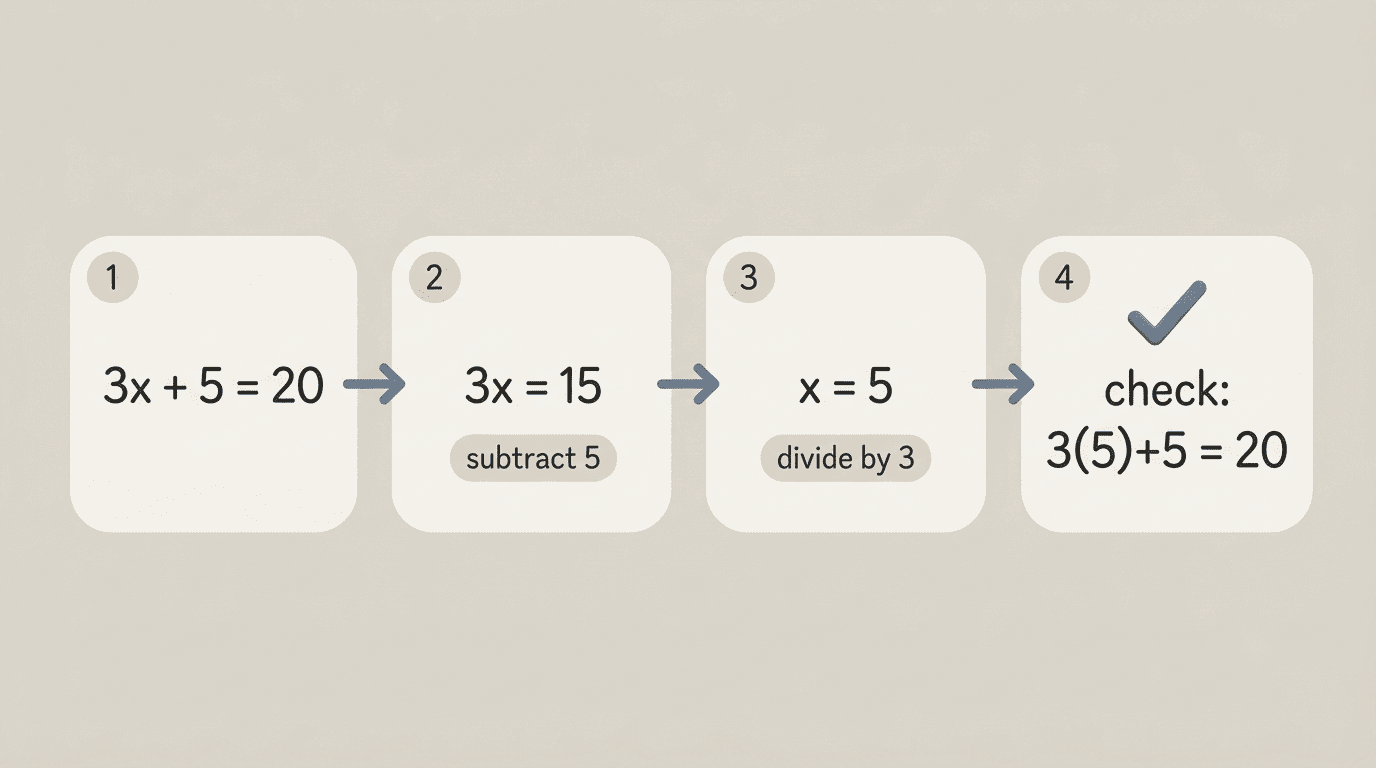
Take a linear equation like 3x + 5 = 20. A step-by-step helper doesn’t just print “x = 5” — it shows the subtraction that isolates the term (3x = 15), the division that isolates the variable (x = 5), and a substitution back into the original equation to confirm it balances. For a quadratic, the same pattern applies: identify the method (factoring, completing the square, or the quadratic formula), show each algebraic move, then verify. The teaching value is in seeing every intermediate line, not just the final value of x.
Geometry: diagram, theorem, compute
For geometry, a helper first identifies what’s being asked — an angle, an area, a missing side — then names the relevant theorem before computing anything. A right-triangle problem calls on the Pythagorean theorem; a circle problem calls on area or circumference formulas. Naming the rule first, then applying it, is what separates a worked explanation from a black-box answer.
Calculus: rule spotting, then apply
Derivatives and integrals work the same way. A good helper names the rule it’s using — power rule, product rule, chain rule — before applying it to the specific function. Recognizing which rule fits which expression is the actual skill calculus courses are testing, so a helper that skips straight to the derivative without naming the rule is far less useful for studying than one that spells it out.
Word problems: translate, then solve
Translating a sentence into an equation is the hardest and most valuable step. Word problems are the one category almost every AI math tool leans on heavily — nearly every competing product markets a dedicated word-problem mode. A solid walkthrough defines the variable first (“let x = the number of hours”), sets up the equation from the sentence, solves it, and then translates the number back into the original context (“so the tank empties after 4.5 hours”). Skipping straight to the equation, without showing how the words became symbols, is the biggest gap between a helper that teaches and one that just computes.
How to Learn the Method, Not Just Copy the Answer
A math AI tutor works best as a patient explainer, not a homework-completion service — the difference between the two comes down entirely to how you use it. This isn’t about policing yourself; it’s about getting your money’s worth out of the time you spend studying, since an answer you didn’t work through rarely survives the next quiz.
Sal Khan, founder of Khan Academy, has been blunt about tools that skip the reasoning step, arguing that it’s easy to wrap a friendly interface around a language model and call it a tutor when all it really does is offer to do the student’s homework for them. His team built Khan Academy’s own AI tutor around the opposite idea — asking the student what they think the first step is, rather than handing over the answer.
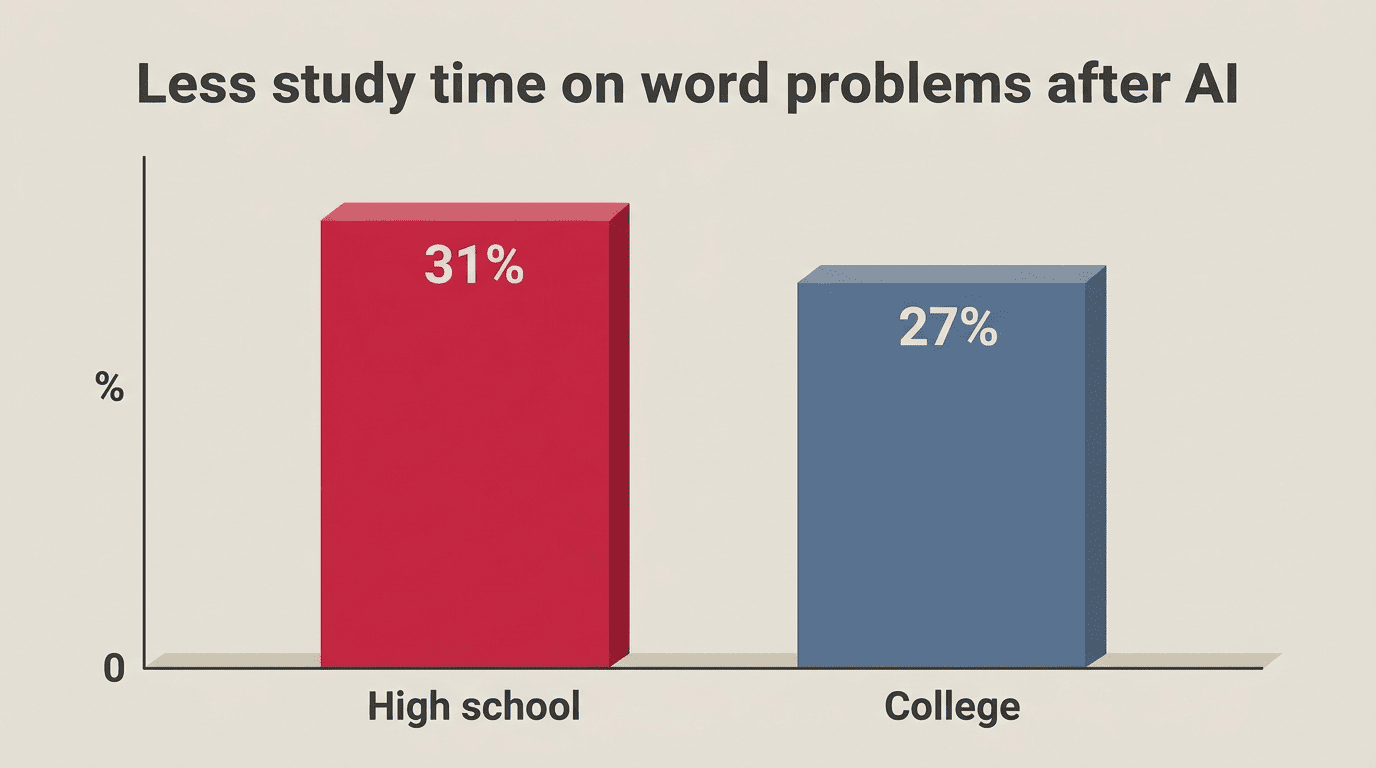
There’s a real cost to skipping that step. Research from the University of California, Irvine, tracking 3.2 million student math problems on the ALEKS learning platform found that after ChatGPT’s release, students spent 31% less time on word problems — the type easiest to paste into an AI — compared with problems that required hands-on graphing, and their odds of answering those AI-susceptible problems correctly on later, no-AI assessments dropped by about 25%. The pattern matches what teachers describe anecdotally: students who lean on a solver instead of working through it lose the skill by the time a no-tools test comes around.
Three habits that keep AI on the learning side
- Attempt the problem first, AI second. Even a wrong attempt tells you exactly where you got stuck, which makes the AI’s explanation click faster.
- Explain the solution back in your own words. If you can’t restate why a step works without looking at the screen, you haven’t learned it yet.
- Redo one problem completely tool-free. Pick any problem from the set and re-solve it from scratch — that’s the real test of whether the method transferred.
Learning use vs. copying
| Learning move | Copying move |
|---|---|
| Attempt the problem before opening the AI | Peek at the answer first, then reverse-engineer the steps |
| Ask “why this step?” on each move | Paste the problem and submit whatever comes back |
| Redo one problem tool-free afterward | Never re-check any answer by hand |
Where AI Still Gets Math Wrong (and How to Catch It)
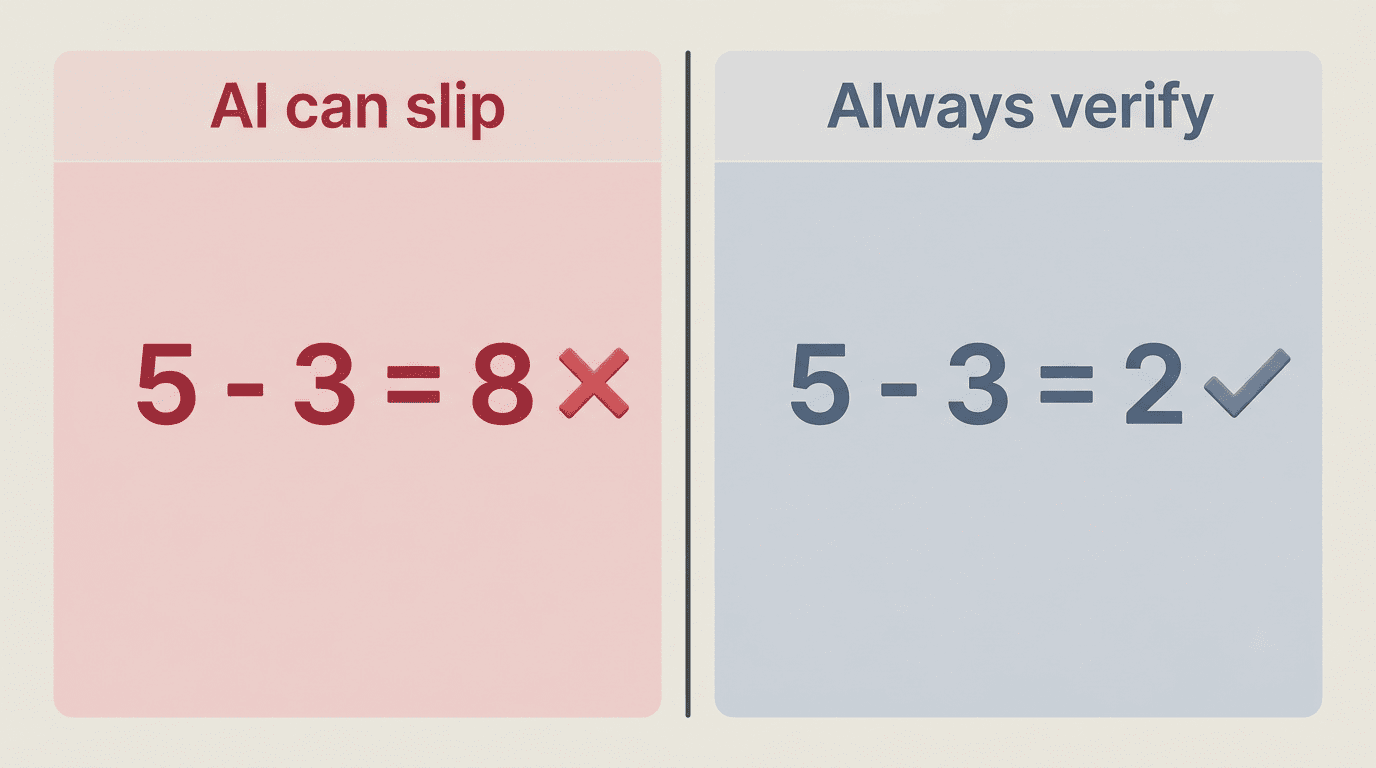
Every major AI math tool carries some version of a disclaimer that it can make mistakes, and that’s not just legal caution — large language models genuinely slip on arithmetic and multi-step logic more often than a calculator does. Mathos AI markets itself as roughly 20% more accurate than general-purpose GPT models on math benchmarks, which is a useful data point, but “more accurate” still isn’t “always right.”
Common AI math mistakes
- Arithmetic slips in long calculations — the further a problem runs, the more likely a digit gets dropped or a sign flips.
- Misreading a photo — OCR regularly confuses 6 and b, or drops a minus sign, especially on handwriting.
- Right method, wrong number — the approach is sound, but a substitution or a coefficient gets copied incorrectly partway through.
- Confidently wrong on multi-step logic — the tool states an incorrect intermediate result with the same tone as a correct one, so nothing in the phrasing flags the error.
- Unit and rounding errors — mixing feet and meters, or rounding too early in a multi-step calculation, throws off the final answer.
How to check the work
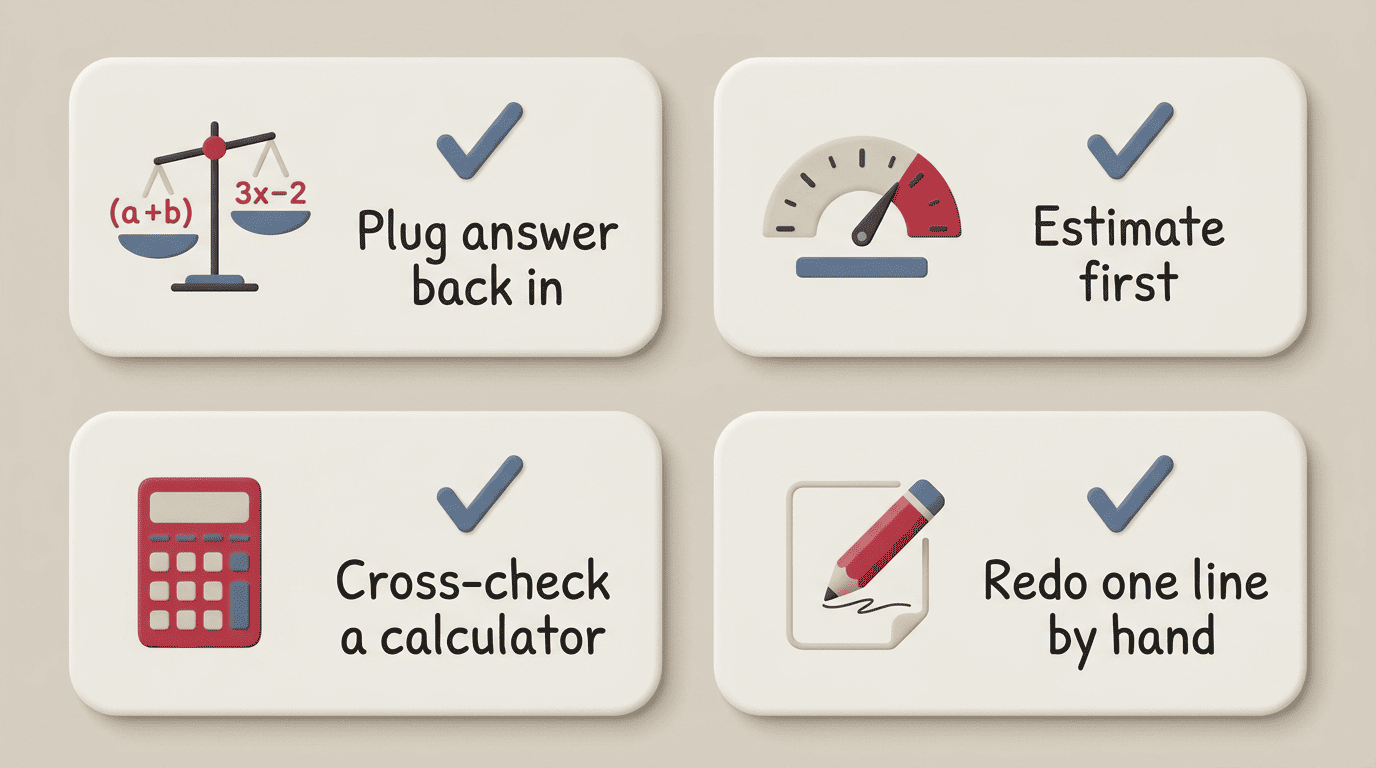
- Plug the answer back into the original equation to confirm both sides actually balance.
- Estimate first — does the size of the answer make sense given the numbers in the problem?
- Cross-check with a plain calculator or a graphing tool like Desmos for anything involving graphs, functions, or roots.
- Re-solve one line by hand — pick the step most likely to have gone wrong and redo just that line manually.
Related homework help guides
- AI science homework helper
- Try an AI homework solver
- AI homework scanner
- Using an AI homework helper