
AI Homework Helper: What It Is and How to Use It to Actually Learn
Staring at a problem you don’t get is one of the most frustrating parts of school. A homework AI helper is a study tool that reads your question and walks you through it step by step — so used well, it turns a stuck moment into a lesson, not a shortcut.

The difference between learning and copying is entirely in how you use it. This guide breaks down what an AI homework helper actually is, how it works behind the scenes, and how to turn it into a personal tutor rather than an answer machine.
What Is an AI Homework Helper?
An AI homework helper is an AI-powered study tool that understands a homework question — typed, pasted, or photographed — and returns a worked explanation across subjects. Think of it as an on-call intelligent tutoring system, available whenever you’re stuck, day or night.
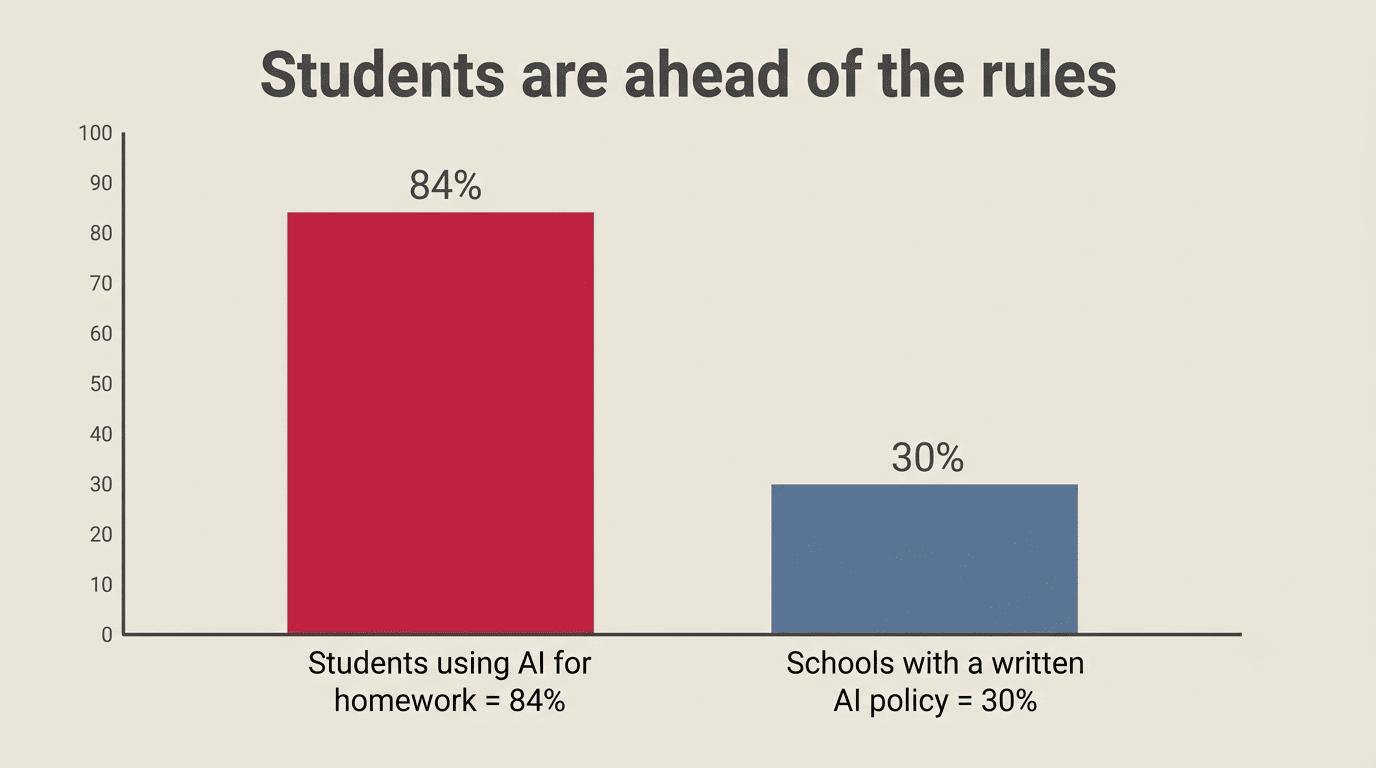
It’s not a replacement for a human teacher. A real tutor knows your history, reads your body language, and can adapt over months of working with you. An AI study companion can’t do that, but it makes up for it with speed, patience, and price: most tools are free or cheap, they never get tired of a question you’ve asked three times, and they don’t judge you for asking something “basic.” That trade-off is exactly why adoption has climbed so fast — roughly 84% of U.S. high-schoolers now say they use generative AI for schoolwork, and a growing majority of college students report using it to study as well.
It’s a tutor, not an answer vending machine
The same AI homework helper can teach you or do your thinking for you — you choose which one it becomes. Ask it for the final answer and nothing else, and it will hand you a shortcut you won’t remember at test time. Ask it to walk you through the reasoning, and it behaves like an AI tutor: patient, step-by-step, and focused on the “why” behind the “what.”
A well-built homework AI helper is generally good for more than just solving problems:
- Explaining the steps behind a solution, not just the final number
- Checking your own work and pointing out where it went wrong
- Quizzing you on material you just reviewed
- Summarizing a reading or textbook chapter
- Drafting an outline for an essay (not the essay itself)
- Generating extra practice problems similar to your homework
How Does an AI Homework Helper Work?
Under the hood, most AI homework helpers combine a few different technologies, and it helps to know what each one is actually doing when you upload a picture of your worksheet.
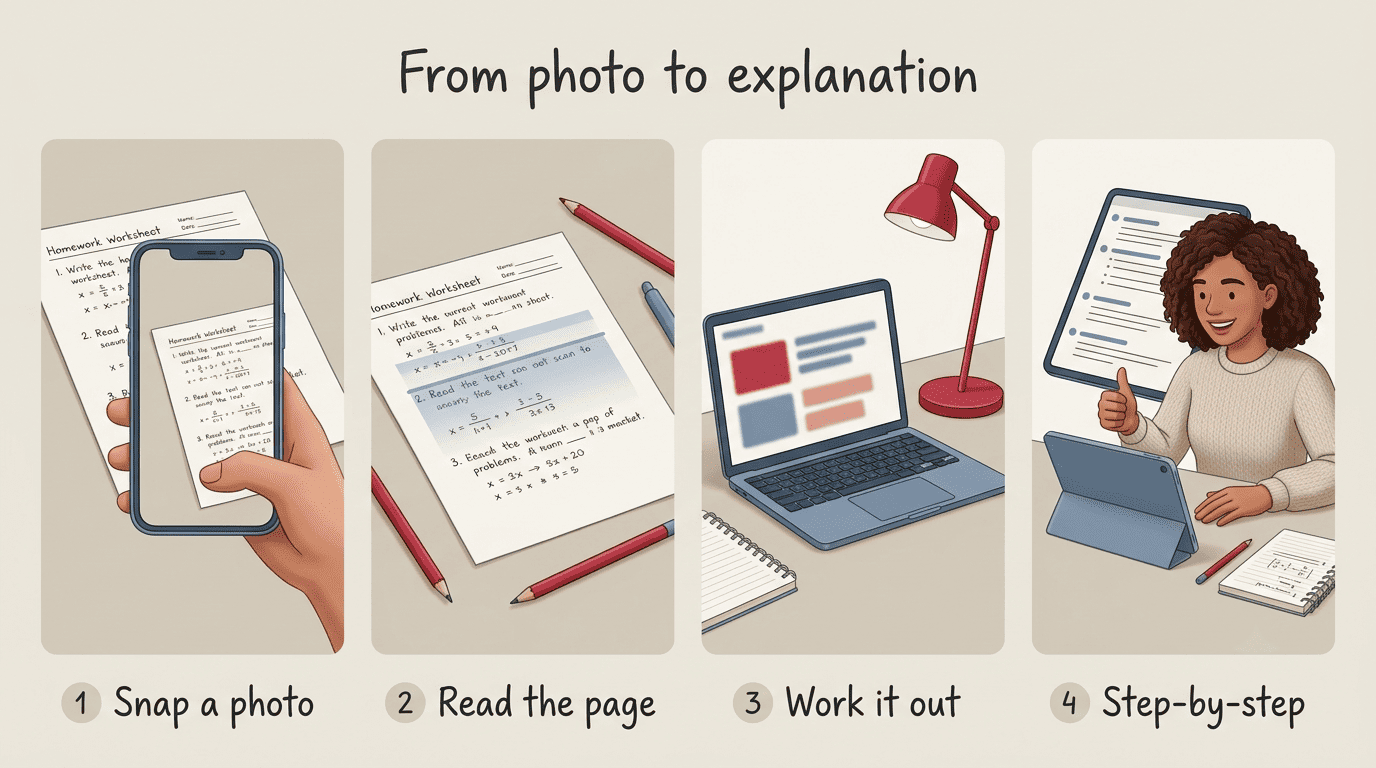
You give it the problem, typed, pasted, or as a photo. Optical character recognition and computer vision then read handwriting, printed text, and diagrams and convert them into machine-readable text. From there, a large language model — and for math problems, often a dedicated symbolic solver working alongside it — interprets the question and works through it. Finally, the tool writes back a step-by-step explanation in plain language you can actually follow, instead of just a final answer.
From photo to explanation in 4 steps:
- Snap a photo, paste text, or upload a PDF of the problem
- OCR/computer vision converts the image into readable text
- The LLM (plus a symbolic math engine for calculations) works the problem
- You get a step-by-step explanation instead of a bare answer
Different input formats suit different situations:
| Input type | What happens | Best for |
|---|---|---|
| Typed question | Read directly by the LLM, no OCR needed | Quick math or short-answer questions |
| Photo of a worksheet | OCR/computer vision extracts text and diagrams first | Handwritten homework, textbook pages |
| PDF reading | Text is extracted, then summarized or analyzed | Long readings, study guides, lecture notes |
| Pasted essay draft | Analyzed for structure, clarity, and grammar | Getting outline or revision feedback |
Which Subjects Can It Help With?
An AI homework helper isn’t limited to math, even though that’s often the first use case people picture. Most tools now stretch across nearly every subject you’ll run into in middle school through college.
| Subject | How the helper helps | How to learn from it |
|---|---|---|
| Math | Step-by-step solutions with a symbolic solver | Re-solve the problem yourself afterward, without looking |
| Science | Explains the “why” behind formulas and processes | Ask a follow-up concept-check question |
| Writing / English | Outlines, structure feedback, grammar notes | Use it for feedback only — never let it write for you |
| Reading | Summaries plus comprehension questions | Answer the questions before checking its summary |
| History / Social Studies | Timelines and cause-and-effect connections | Explain the chain of events back in your own words |
| Test prep (SAT / ACT) | Practice questions and spaced-repetition flashcards | Time yourself like it’s the real test |
The pattern across every subject is the same: the AI study helper does the explaining, and you do the re-doing. Math homework help is only useful if you can solve the next similar problem without it; essay feedback is only useful if you rewrite the paragraph yourself afterward.
Learn vs. Copy: How to Actually Get Smarter
This is the part that determines whether an AI homework helper makes you sharper or makes you dependent. The same tool, used two different ways, produces two very different students.
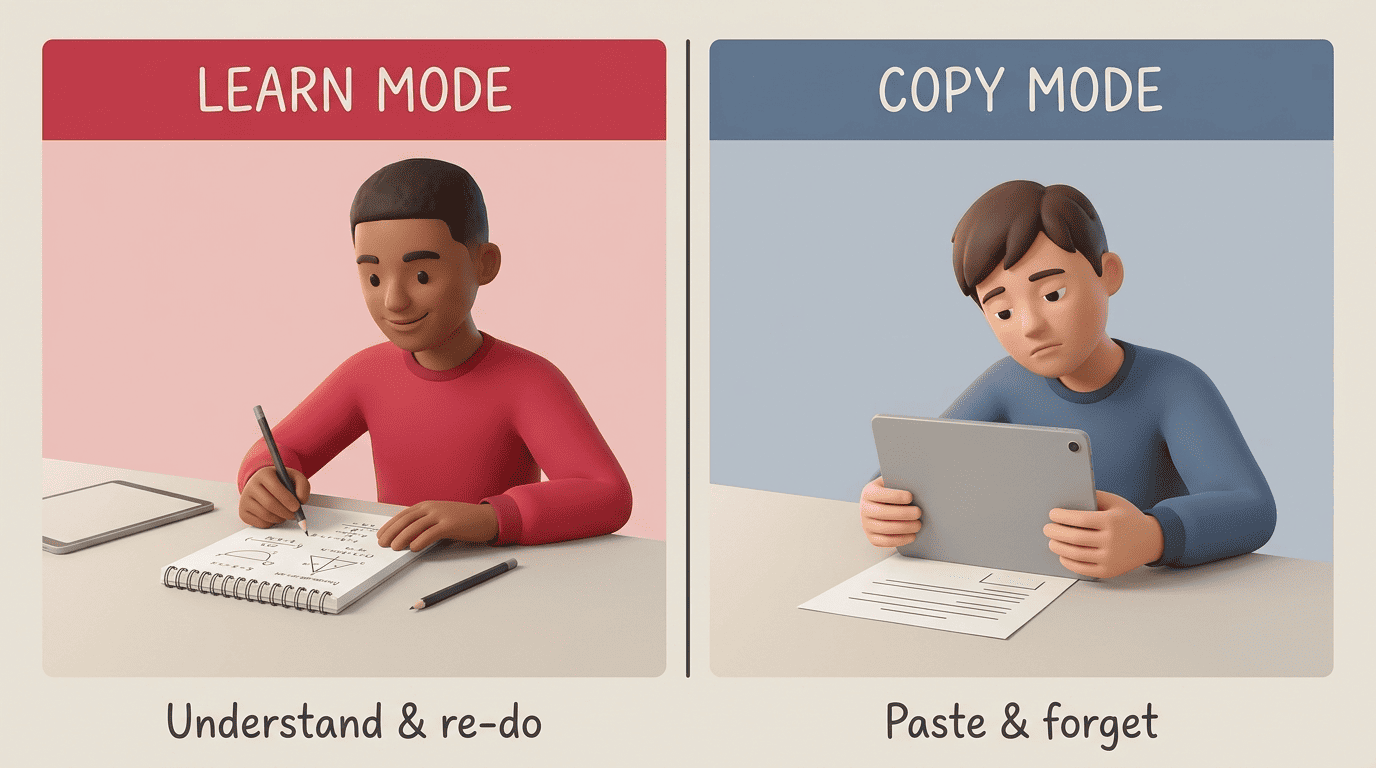
Start with the try-first rule: spend 15–20 minutes attempting the problem yourself before you open the helper at all. That struggle is where most of the actual learning happens — the AI explanation lands differently once you already know where you got stuck. Then use the helper to get unstuck, not to skip the work entirely. The U.S. Department of Education’s Office of Educational Technology makes a similar point in its guidance for schools: AI tools work best when they support human-directed teaching and learning, walking students through the reasoning, not when they replace the thinking part by handing over a final answer.
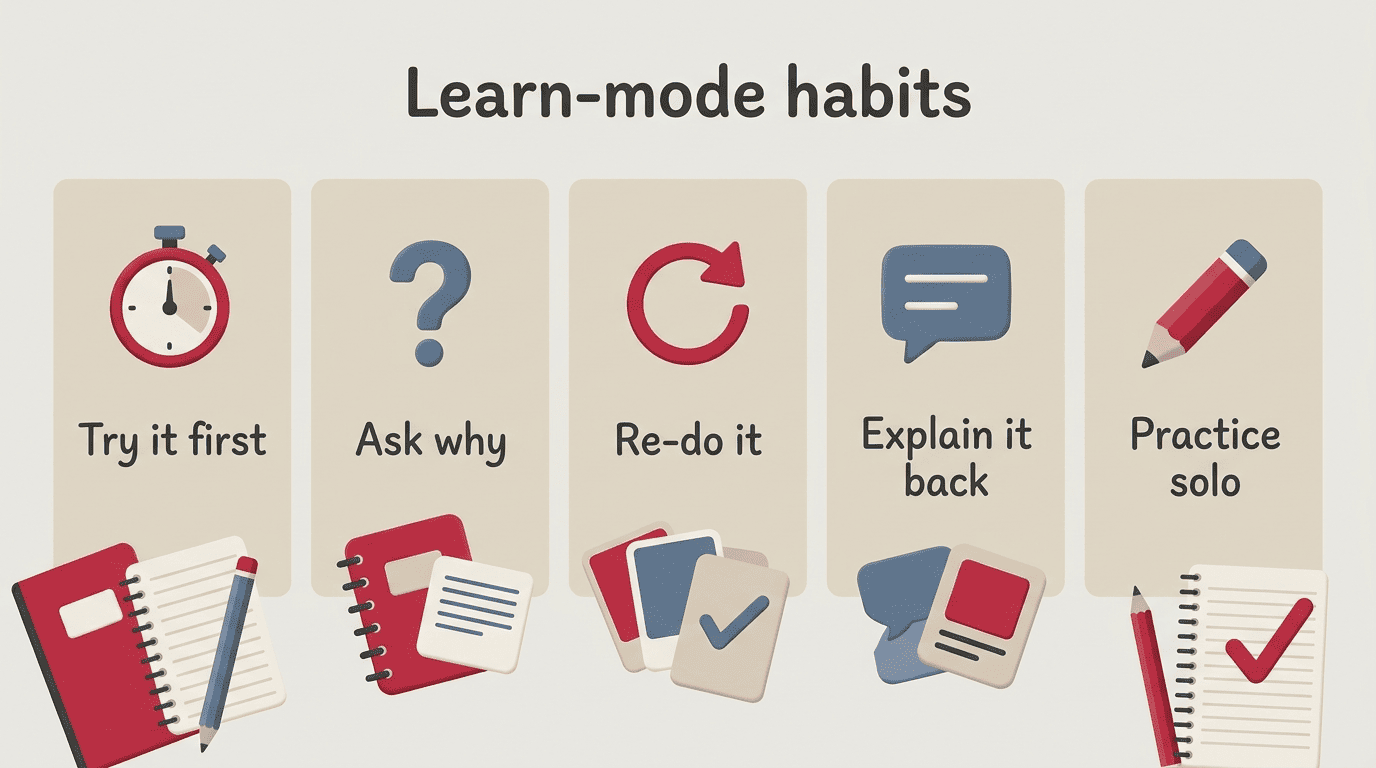
Learn-mode habits that actually build skill:
- Try the problem yourself first, for at least 15 minutes
- Ask “why does this work” instead of “what’s the answer”
- Re-do the problem afterward without looking at the explanation
- Explain the solution back in your own words, out loud or in writing
- Ask for a similar practice problem and solve it solo
Copy-mode traps to avoid:
- Pasting the AI’s answer straight into your homework without reading it
- Submitting AI-written text as your own essay or paragraph
- Skipping the try-first step every single time
- Never double-checking whether the explanation is actually correct
Check your understanding, not just your answer
A simple trick borrowed from the Feynman technique: after the helper explains something, close the window and explain it back in plain language, as if you were teaching a friend. If you can’t, you don’t understand it yet — go back and ask a follow-up question. Many tools will also quiz you directly if you ask them to, which is a fast way to confirm the explanation actually stuck.
A Gentle Note on Academic Integrity
Using an AI homework helper to understand a concept is fine, and honestly encouraged — that’s what it’s built for. Submitting its words as your own, without understanding or rewriting them, is where it crosses a line into academic integrity territory.
Fundamental values of academic integrity include honesty, trust, fairness, respect, responsibility, and courage.
International Center for Academic Integrity
Only around 3 in 10 schools have an actual written policy on AI use, and plenty of students say they’re not sure what the rules even are — so the safest move is to check your class or school’s specific policy before you rely on one for a graded assignment. Cite it when your teacher requires citation, and keep your own voice in anything you turn in. Teachers increasingly run submissions through detectors like Turnitin and GPTZero, so leaning on “understand, then write it yourself” isn’t just the honest path — it’s also the one that keeps you out of trouble.
Limitations: Always Double-Check
No AI homework helper is 100% accurate, even the ones that advertise accuracy rates around 98%. The bigger risk isn’t that it’s wrong occasionally — it’s that it can be confidently wrong, stating an incorrect answer with the same tone as a correct one.
When to be extra careful:
- Dates, names, and citations — verify these against a real source
- Tricky multi-step word problems where one wrong assumption breaks everything
- Anything that will actually be graded, not just practice
Re-solve math problems yourself to confirm the steps hold up, cross-check factual claims against your textbook or a reliable source, and never cite something the tool mentions if you can’t find it yourself. The habit of double-checking pairs naturally with the learn-mode moves that build real skill.
On cost, most AI homework helpers offer a usable free tier, and premium plans with more usage or advanced subjects typically run around $4–$20 a month.