
AI Homework Help, the Right Way: Get Unstuck, Understand Every Step, Actually Learn
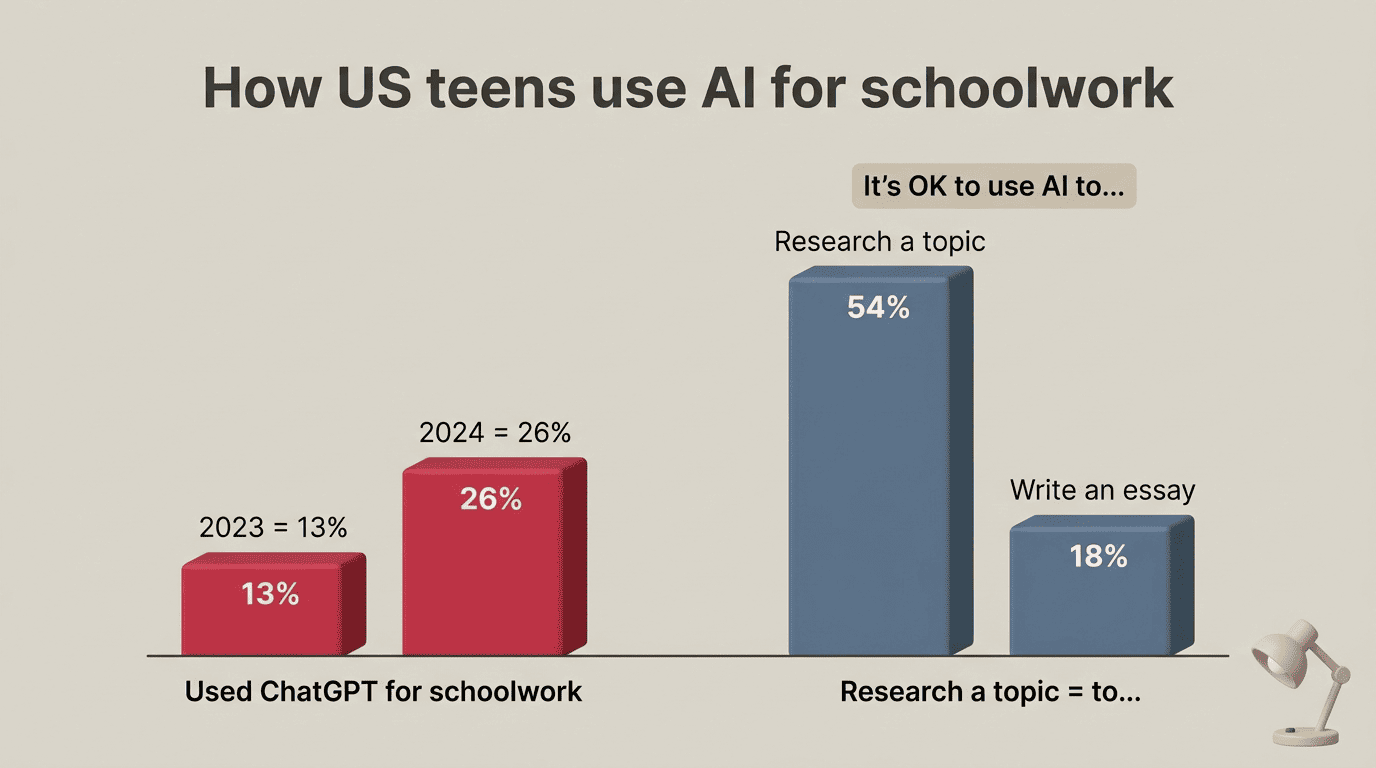
Staring at a problem you can’t crack at 10 p.m. is the worst — and a good homework AI can turn that stuck feeling into a lightbulb moment instead of a copy-paste shortcut. About a quarter of U.S. teens now say they’ve used ChatGPT for schoolwork, roughly double the share from 2023, according to Pew Research Center. The trick is simple: let it explain, not answer for you.
Used this way, an AI homework helper is a patient tutor that walks you through each step until the method clicks — so the next test doesn’t blindside you. This guide shows exactly how: the line between learning and cheating, a step-by-step workflow, subject-by-subject tips, how to catch wrong answers, and how to make sure you actually learn.
Is Using AI for Homework Cheating? The Honest Line
Using AI for homework is not automatically cheating — it depends entirely on what you ask it to do. Asking it to explain a concept you’re stuck on is learning. Asking it to write the paragraph you’re supposed to write, then submitting that paragraph as your own, is cheating. The line isn’t about whether you opened the tool at all — it’s about who ends up doing the thinking.
Where the line actually sits
The one-sentence rule: if AI does the thinking and you submit it as your own, that’s cheating; if AI explains a concept, quizzes you, or helps you find your mistake, that’s learning. Pew’s research backs this split up with real numbers — 54% of teens say it’s okay to use ChatGPT to research a topic, but only 18% say it’s okay to have it write an essay for them. A 2023 Stanford survey found that 60-70% of high schoolers admit to some form of cheating, and that share barely moved before versus after ChatGPT arrived — the tool didn’t invent the problem, but it does change what cheating looks like day to day.
A simple “learning vs cheating” table
| Action | Learning or cheating? | Why |
|---|---|---|
| Ask AI to explain why step 2 works | Learning | Builds understanding you can reuse |
| Paste the essay prompt, submit the output | Cheating | The work isn’t yours |
| Ask for a hint before the full answer | Learning | You still do the solving |
| Copy the solution without understanding it | Cheating | Nothing sticks for the test |
| Have AI quiz you before a test | Learning | Tests recall, not just recognition |
| Turn in AI-written text as your own words | Cheating | Misrepresents authorship |
In Pew’s most recent teen survey, 59% say cheating with AI chatbots happens regularly at their school — but common isn’t the same as safe for your grade or your understanding of the material. Academic integrity, the idea that the work you submit is honestly your own, doesn’t disappear just because a habit becomes common.
Rule #1: Check Your School’s AI Policy First
Before anything else: policy decides everything. The exact same prompt can be completely fine in one class and a violation in another, so the tool itself isn’t the deciding factor — your teacher’s rules are.
Ask before you start, not after
The best moment to ask is before you start the assignment, not after you’ve already used AI on it. Some assignments actually require AI use as part of the task; others ban it outright, and a few sit in a gray zone your teacher can clarify in one sentence. Waiting until you’re caught means the honest question never got asked.
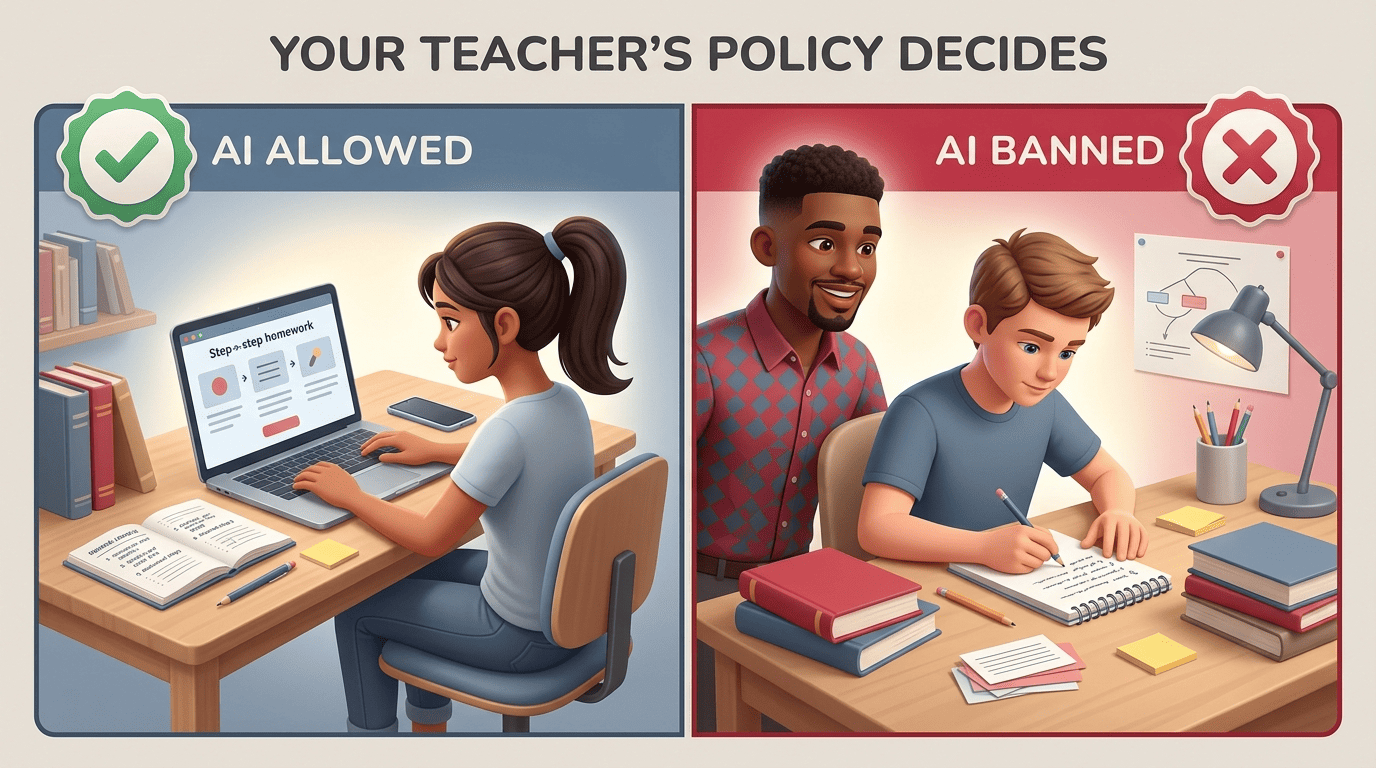
Worth knowing: some recent surveys put teacher use of AI-detection tools as high as 68%, which means “they probably won’t notice” is a worse bet than it used to be. A few questions worth asking your teacher up front:
- Is AI allowed for brainstorming or outlining this assignment?
- Can I use it to check my work after I finish, or not at all?
- Does the syllabus already cover this, and did I miss it?
- Do I need to disclose or cite AI use if I do use it?
- Is there a difference in policy between homework and graded tests?
When AI is banned outright
If your school or teacher bans AI for a given assignment, keep it in its lane: use it only for things you won’t submit, like getting a concept explained in plain language or generating extra practice questions, and write the actual assignment yourself from scratch. If your school requires disclosure when AI touches your work in any way, follow that rule exactly — a quick citation note is a lot cheaper than an integrity hearing.
Use AI as a Tutor, Not an Answer Machine
The single biggest mindset shift is swapping “give me the answer” for “help me get there.” Think of it as scaffolding: the AI builds the temporary structure, but you’re still the one climbing it, step by step, until you can stand on your own.
Prompts that teach instead of tell
The prompt you type decides whether you get taught or just told. A few that push toward understanding instead of a shortcut:
- “Give me a hint, not the answer.”
- “Ask me a question that points me to the next step.”
- “Explain WHY this step works, not just what it is.”
- “Show one worked example using different numbers.”
- “I think the answer is X — where did my reasoning go wrong?”
- “Quiz me on this concept before I try the real problem.”
UNESCO’s guidance on AI in education recommends treating AI output as something to check and question, not something to trust automatically — a habit worth building into every one of these prompts.
The “wrestle first” habit
Try the problem yourself for five to ten minutes before you open the AI tool at all — call it “the wrestle.” That short struggle is where you find out exactly what you don’t understand, so when you do bring in AI, it’s fixing one specific gap instead of replacing your thinking from step one. Keep the AI session itself short too — roughly 10-20 minutes is plenty for most homework problems before you’re either unstuck or need a different approach entirely.
A Step-by-Step Workflow to Get Unstuck
Here’s what the honest version of “ask AI for homework help” actually looks like in practice, from the moment you’re stuck to the moment the method sticks.
The 6-step get-unstuck loop
- Try it yourself first (the wrestle) — five to ten minutes, no AI.
- Show the problem to the AI — type it out, or upload a photo or PDF; most tools accept all three.
- Ask for a hint, not the full answer.
- Ask “why” on each step until the logic makes sense.
- Redo the entire problem yourself, with no AI open.
- Do one similar problem on your own to confirm it actually stuck.
One honesty check built into the loop: the goal at every step is the method, not a finished answer to copy into your notebook.
Check the steps, don’t trust the final answer
Fast answers from AI aren’t always right, so check the steps along the way instead of trusting the final number outright. Take a simple equation like 3x + 5 = 20: the AI might say x = 5. Before you trust it, plug 5 back in — 3(5) + 5 = 20 — and confirm both sides match. That one substitution check catches most bad solutions in seconds, and it’s a habit worth carrying past math into every subject.
AI Homework Help Across Subjects
The right way to use AI for homework changes depending on the subject — a method that works for a math problem doesn’t transfer cleanly to an essay.
Subject-by-subject table
| Subject | Ask AI to… | Don’t |
|---|---|---|
| Math | Explain the method, then check by substitution | Copy the final number without the steps |
| Essays & writing | Brainstorm, outline, give feedback on YOUR draft | Submit AI-written text as your own |
| Science | Explain concepts, walk through lab-writeup logic | Fabricate or guess at data |
| Reading & analysis | Clarify vocabulary, discuss themes | Paste a summary in place of actually reading |
| Test prep | Generate practice questions and flashcards | Memorize answers you can’t explain |
| Languages | Practice conversation and check grammar | Machine-translate whole assignments |
Writing without crossing the line
Essays are the riskiest subject for AI use — only 18% of teens think it’s okay to have AI write one, compared to 54% who are fine with using it to research. That gap makes sense: an essay is supposed to be your voice and your argument. Used well, AI helps with brainstorming ideas, building an outline, and giving feedback on a draft you already wrote — a second pair of eyes, not the author. The words that end up on the page need to be yours.
Catch the Wrong Answers: AI Hallucinations
AI can sound completely confident while being completely wrong — a pattern known as hallucination. That happens because large language models predict the most likely next words, not verified truth, so a fluent, well-formatted answer can still be flat-out incorrect. Confident doesn’t mean correct.

UNESCO’s own guidance on AI in education makes the same point at a policy level — the technology is powerful, but it needs to be checked, not trusted blindly:
Artificial Intelligence (AI) has the potential to address some of the biggest challenges in education today, innovate teaching and learning practices, and accelerate progress towards SDG 4. However, rapid technological developments inevitably bring multiple risks and challenges, which have so far outpaced policy debates and regulatory frameworks.
UNESCO, AI in Education
That gap between how fast the technology moves and how well it’s checked is exactly why the habit of verifying an answer matters more than the answer itself.
A 4-point verification checklist
- Compare the answer with your class notes, textbook, or formula sheet — your real reality check.
- Plug the answer back into the original problem to see if it actually works.
- Ask the AI to explain its reasoning, then look for the weak link in that explanation.
- Cross-check any fact, date, or citation against a trusted source before you rely on it.
Make Sure You Actually Learn (Don’t Outsource Your Brain)
Cognitive offloading is the real risk here. If AI does the thinking every time, your own critical-thinking muscle gets less exercise. A 2025 study linked frequent AI use to lower critical-thinking scores among students who leaned on it heavily — the tool didn’t make anyone less capable on its own, but skipping the “figure it out” step repeatedly seems to.
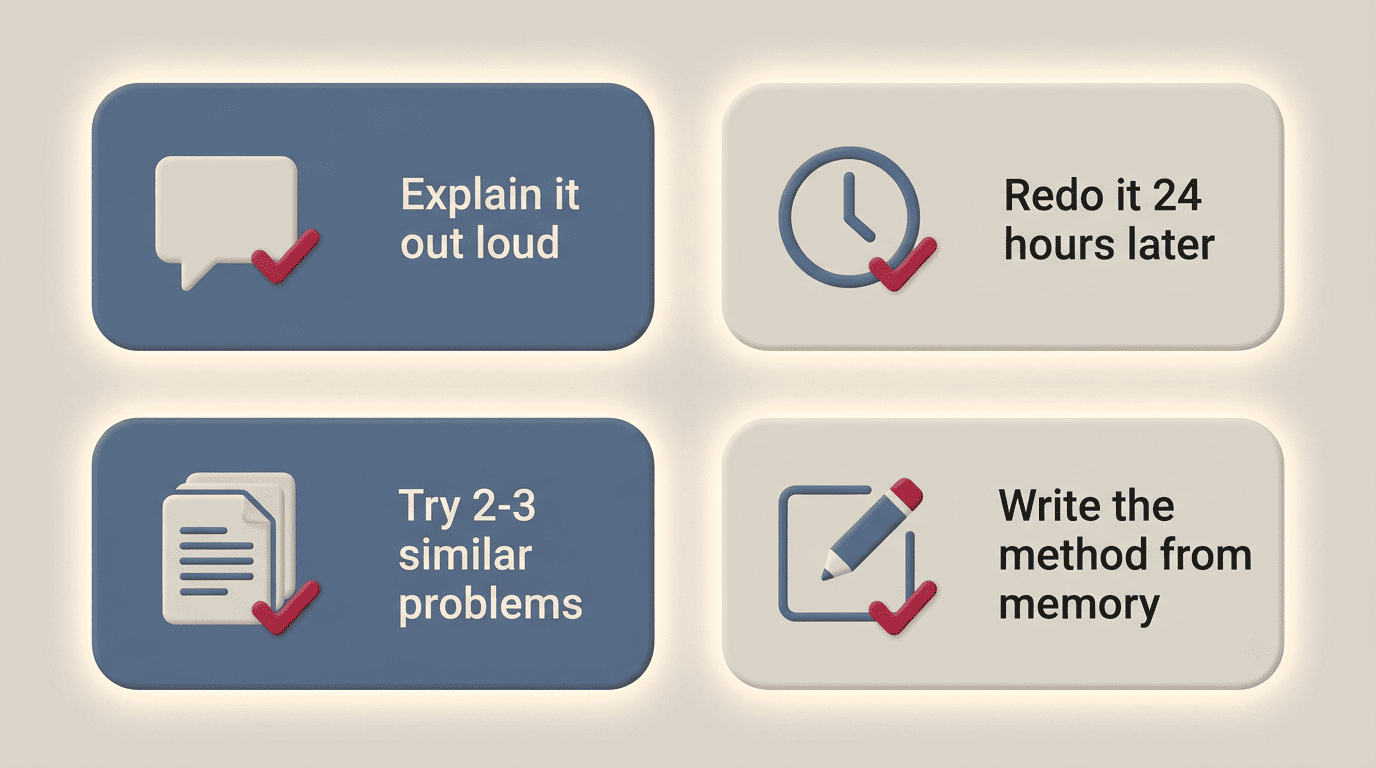
The Feynman technique tests whether it actually stuck. Explain the concept out loud, in plain words, as if you were teaching a friend who’s never seen it — if you stumble, that’s exactly where you still don’t understand it.
A short reset 24 hours later is the real test. Redo the same problem the next day with no AI open at all; if you can’t, the first pass didn’t teach you as much as it felt like it did.
Self-testing that proves it stuck
- Explain the concept out loud in plain words, as if teaching a friend (the Feynman technique).
- Redo the problem 24 hours later with no AI.
- Do two or three similar problems solo.
- Close the laptop and write out the method from memory.
Here’s the balance worth keeping in mind: the World Economic Forum’s Future of Jobs Report 2025 names AI and big data as the fastest-growing skill set employers want. The goal isn’t avoiding AI — it’s learning to think alongside it instead of handing your thinking away.
What to Look For in an AI Homework Helper
You don’t need a brand-name ranking to pick a decent AI homework helper — you need a short checklist of what actually matters for learning, not just for getting an answer:
- Explains steps, not just the final answer.
- Lets you ask follow-up questions on the same problem.
- Accepts photos and PDF uploads, not just typed text.
- Covers the subjects you actually need help with.
- Shows its reasoning so you can spot a weak step.
- Has a free way to try it before you commit to anything.
A homework AI helper that checks these boxes works like a tutor sitting next to you, not a vending machine for finished answers.
Free vs paid, and the honest caveat
Plenty of tools are free to start — some offer around 20 free tries a day with no sign-up required, which is often enough to get unstuck on a handful of problems a week. The honest caveat applies no matter what you pay: even the best AI homework helper is a tutor, not a replacement for your own thinking. The value is in the explanation, not in the finished answer sitting at the bottom of the screen.